
Back
Perfume Scent Notes Experience
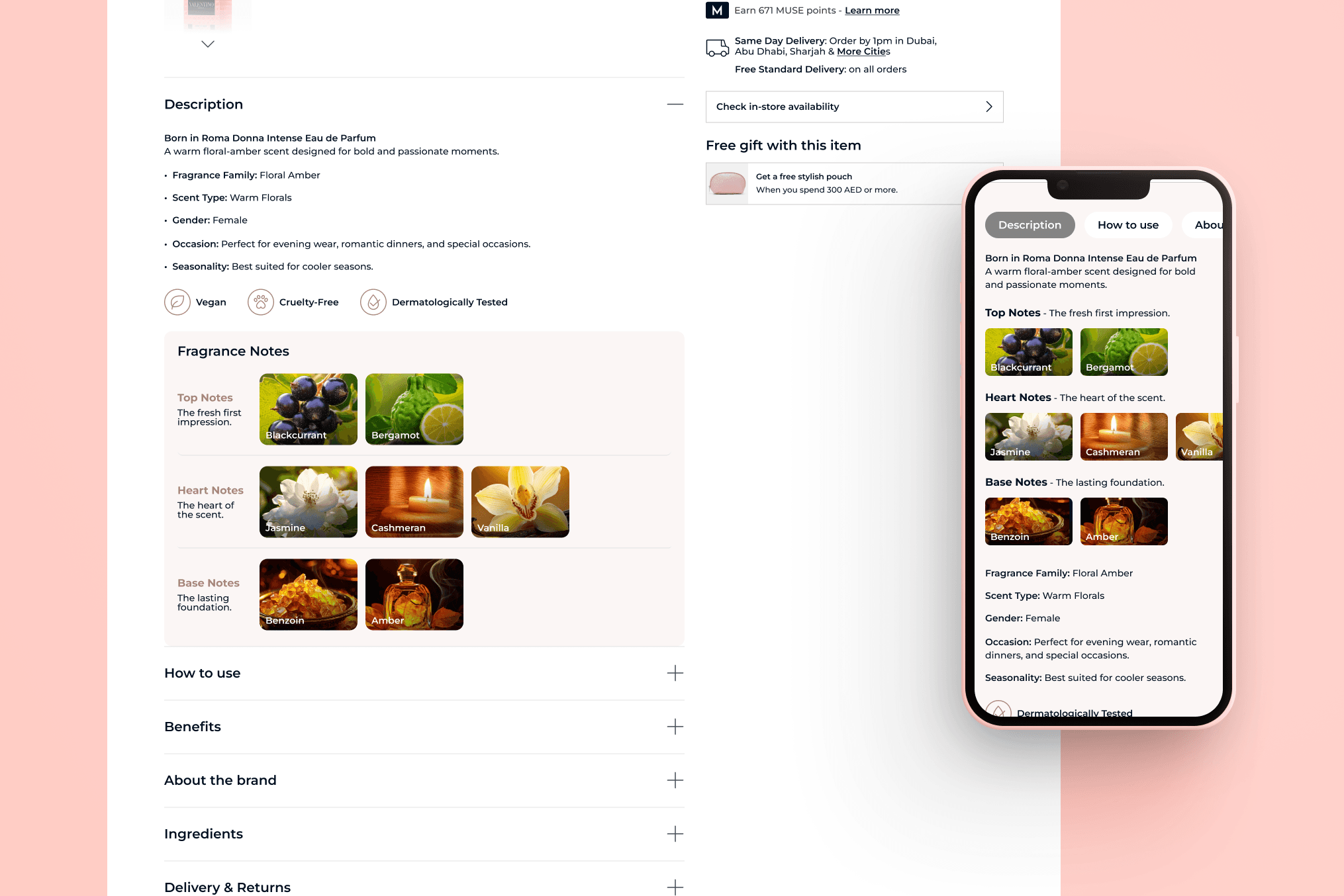
Designed a scent notes section helping customers understand fragrance compositions visually.

Role
UX & UI Designer
Team
Product managers and developers
Timeline
Feature enhancement
Company
Faces Beauty
Scope
UX & UI Designer
Goal
Product managers and developers
Project Context
Perfume sales in the GCC are heavily influenced by fragrance notes. Users often want to explore perfumes by their scent composition before making a purchase.
The existing Faces product pages lacked clear scent information, making it harder for customers to choose products that fit their preferences.
I was tasked with designing a scent notes section that is both visually appealing and informative, integrated seamlessly into the product page.
Add visual: Screenshot of the old product page without scent notes.
The Problem
Users were unsure of fragrance composition before purchasing.
Key influencers for perfume selection (top, middle, base notes) were not displayed clearly.
Customers often relied on in-store testing or guesswork, leading to decision friction.
Users
GCC shoppers who prioritize fragrance notes in perfume selection.
Both male and female perfume enthusiasts looking for detailed product information online.
Add visual: Persona highlighting fragrance preferences.
Research
Competitor analysis: Amazon, Sephora, and other GCC perfume retailers to see how scent information was presented.
User interviews and surveys to understand what details matter most (top, middle, base notes, intensity, longevity).
Insights: Customers value clear, structured scent information and often use it to compare products.
Add visual: Research insights infographic or table.
Product Thinking
The key insight was that fragrance discovery is central to the purchase decision, especially in GCC markets.
Design decisions focused on:
Structuring the scent notes into top, middle, and base sections.
Using visual hierarchy and icons to make notes scannable.
Ensuring the section is mobile-first, as a large portion of traffic is on mobile devices.
Allowing integration with related features, like “customers who bought this also liked…” based on scent profiles.
Add visual: Concept diagram showing feature integration with product page.
UX Challenges
Representing complex scent information clearly and quickly.
Balancing visual appeal and accessibility.
Designing for users who may not be familiar with perfume terminology.
Ensuring mobile-first responsiveness without losing clarity.
Add visual: Annotated screenshot showing design decisions for clarity.
Key Flows
Customer lands on perfume product page.
Scent notes section is visible below the main product info.
User scans top, middle, and base notes.
User can compare scents with similar products or add to wishlist/cart.
Add visual: Flow diagram or micro-interaction mockup.
Design Decisions
Icons for notes: small symbols to represent top/middle/base scents visually.
Expandable sections: allow users to reveal more details about each note if desired.
Color coding and hierarchy: make scanning fast and intuitive.
Consistency with brand UI: matches Faces visual identity and product page layout.
Add visual: UI mockup highlighting the scent notes section.
Results / Impact
Clearer scent information reduced user uncertainty and helped shorten the decision-making process.
Expected to increase conversion for perfume products.
Feedback from internal stakeholders noted the feature aligns well with GCC customer preferences.
Add visual: Before/after comparison of product pages, or prototype screenshots.
Next Steps
Consider adding filtering by scent profile across the site to allow discovery by top, middle, or base notes.
Explore personalized recommendations based on user scent preferences.
Potentially integrate in-store scent discovery tools that sync with the online scent notes feature.